Showing posts with label Web Design. Show all posts

Sunday, January 25, 2015

Extraordinary tools for Web developer.

                    Web deeveloper do some extraordinary tools for collaboration    

Tools exist to support the work of the many online web developer Tools which has some extraordinary young veteran in the developer takes forever. Tools to aid in the collection and ...

1. Firebug: Firebug extension to the Mozilla Firefox is one of the many benefits for the net. It has built-in JavaScript debugger to step developer written script and the mistakes of the written script.

http://getfirebug.com

2. Internet Explorer Developer Toolbar: Internet Explorer Developer Tool Firebug like the Internet Explorer Add-ons, which is a help to write the site in internet explorer. Especially those who use the Developer Safari or Firefox Cross-compatibility is an important problem in Internet Explorer Developer Toolbar.
http://www.microsoft.com/en-us/download/default.aspx

3. Pixie: Pixie is a Software that lets you to the Color HEX, HTML, RGB, CMYK, HSV's Code View. http://www.nattyware.com/pixie.php

4. CSSTidy: CSSTidy a opensourse application CSS code greatly reduces the file size to optimize and increase the speed of the resulting website. CSSTidy to understand how it works "before and after" examples can see well. http://csstidy.sourceforge.net/index.php

5. GrepWin: GrepWin's going to work! 5000 HTML files to be sent to the buyer, and that's where he's written seisthane Good Better to write. This is the right thing to use GrepWin. ttp: //code.google.com/p/grepwin/downloads/list

6. LastPass: LastPass site is a site that will save your passwords, and with 100% security. https://lastpass.com/

7. Intuitive Color Picker: This is a good tool to select the color you like. Move the mouse to the color hue and lightness, you just can use your favorite color at the website. http://color.hailpixel.com/

8. Everything: Everything Software is a small but not too small. Many of Windows XP, Windows 7, Windows 8's Search Engine'm familiar with. We use the Search Engine to search for files on the computer? Everything is a Software that our computer file that helps us find the inside of 30 seconds maximum. Http://www.voidtools.com/

9. Generate WP: GenerateWP's who I am, and I try to make WordPress Themes GenerateWP a great site for them. http://generatewp.com/

10. Pure: Responsive Web Design is a very good site for it. http://purecss.io/

11. TinyPNG: It takes a lot of smart tools to reduce the image size. Tools may be reduced to 70% of the png file. And I believe you will not find any difference between the two images. http://tinypng.org/

12. Icon: Icon understand and see what this site is used. http://findicons.com/

13. DOMTool: DOM is a remarkable tool that lets debheloparadera saved a lot of time. DOM HTML form takes input and provides the correct output. http://muffinresearch.co.uk/archives/200...8/domtool/

14. Bootstrap: Twitter bootstrap within one hour of an extraordinary tools by which you can create incredible responsive website. Twitter bootstrap biggest advantage here is that you will find plenty of examples in which you create a great website will cooperate. http://twitter.github.io/bootstrap/.


I'll see you again at another tune.(collected)

Friday, January 23, 2015

HOW TO MAKE A WEBSITE.

                                              Step One

                                Choosing your website platform - WordPress

Choose a website building platform

Building a fully working and eye-catchy website isn’t that difficult – even for a beginner who isn’t very computer savvy. But things can go extremely wrong when you don’t choose the right website building platform. A lot of people think that creating a website from scratch is difficult and requires high level of coding and design skills, but that’s not true.
Before I help you to choose the right platform for your website, I want you to let you know that there are tons of different ways to build a website. Back in 2004, most of the sites were built with HTML, CSS or even FLASH.
In 2014, things have changed a lot to say the least. CMS (Content Management Systems) have started to dominate the whole web developing industry. See the graph below.
Popular website building platforms
Image and data credit: Opensource CMS
As you can see, nearly half of the websites on the internet are running on WordPress website platform. The reason is quite simple, actually:
1) No need to know HTML or any other computer coding languages.
2) WordPress itself is FREE and it has tons of different free themes/layouts to choose from.
3) You can create access to multiple users who can publish content to your blog.
4) You can add content, images and videos just by logging into your WordPress dashboard.
5) Your website will look professional, it’ll work on mobiles and tablets as well. Your site will be up and running in less than 30 minutes.
My own site, the one that you are currently browsing is also built with WordPress. As an alternative, you can check out other similar website platforms, such as Drupal and Joomla. I’ve even made a pretty comprehensive Difference between wordpress-vs-joomla-drupal. If for some reason you don’t want to build your site with WordPress, check out my Drupal, Joomla and HTML5 guides as well. They are all FREE to use.But for a beginner, I’m suggesting to stick with WordPress. If you wish to know more how popular WordPress is, have a look at this article:facts of wordpress.

What about all the websites that offer free website creation?

You must have heard about Weebly, Wix and other similar sites where you need to register, enter your personal details and once that’s done you’ll be able to create a free website.
At first it might sound like a really sweet deal, but actually there are three big “no-no”‘s
1) You don’t have a control over your website – Your site will be hosted on another website, and thus it makes them literally own your website. I know it might sound confusing, but in short – you just don’t have control. If they think that your site is violating their TOS – they can easily delete it with no warnings. Do you want your website (or business) rely on that? Probably no.
2) Poor design and limited functionality – Your site will look more or less blank or similar to the other websites on the web. They have limited themes and templates to choose from which makes your site a bit boring for the visitor. On the other hand, WordPress has over 1500 different themes and layouts to choose from.
3) You need to pay if you want to move further – If you want to get your own domain name (YourWebsite.com) or you want to get more disk space/bandwidth – you need to pay. That’s the main reason why I suggest you to host your website by yourself by choosing a reputable hosting company.
Of course, if you want – you can try them out. But I’m sure you can make a way more better website with CMS (WordPress) – and you’ll keep the control over your web property.

I’m not very computer savvy, can I still do it with WordPress?

I get emails everyday where people all hesitating whether to give it a try and create a website by themselves or just hire someone.
My answer is always the same: Try it. 

This guide is mainly for people who are interested in making a professional-looking website with minimal costs and without any previous knowledge. In most cases, it’s a smart choice to make a website yourself rather than spending   Earning on website .
Developers who will use WordPress (in most cases) anyway.
Recently, this guide has helped a lot of new start-upssmall business ownerscreative persons (writers, artists, photographers), freelancers and bloggers (with WordPress you are able to set up a blog as well).

                                                  Step Two

                                         Finding a Web Host and a Domain Name

Before I move on and give you the step-by-step instructions for setting up a web page with WordPress, I need to let you know that it will cost you some money. WordPress itself is FREE, but a personal domain name (YourSiteName.com) and hosting (service that connects your site to the internet) will cost you approximately $3-$4 per month. If you don’t get hosting nor domain, your site address will look a bit un-professional. Some examples: YourBusiness.weebly.com or YourWebsite.wix.com
I’ve mostly used iPage as a domain and hosting registrar, so it’s worth checking them out. 


In short, if you want to set up a website for others to read/browse – you’ll need both of them (domain & hosting). When you buy a hosting and a domain name, you’ll also get a personal email account(s): you@yoursite.com – Cool, right?
If you already have a domain and hosting, feel free to skip this step and move onto Step 2, where I’ll going to explain you how to set up a website.

If you DON’T HAVE HOSTING/DOMAIN, see my instructions and suggestions below:

 
One of the hardest things is coming up with a decent domain name. Here are few tips that could help you in the long run:
  1. If you are planning to create a website for your business then simply use the company name as a domain. For example: YourCompanyName.com
  2. If you are planning to set up a website for yourself, then YourName.com can be a suitable option as well.
  3. If you are having trouble finding the best possible domain name for your website I suggest you follow these three simple guidelines:
  • Is it brandable? For example, if you make a site about poetry then best-poetry-website.net is not a good choice: poetryacademy.com or poetryfall.com are much more better.
  • Is it memorable? People tend to like short, understandable domain names. If your domain name is too fuzzy and long then when they want to return they will have already forgotten it.
  • Is it catchy? Coming up with a catchy, cool name is pretty difficult since there are approximately 150 million domains.
       However, there’s one rule that always applies to domain names: If you like it, go for it.
      

Hosting & Domain – Where should YOU get it?

As I mentioned above, in addition to a domain you will also need hosting. There are literally hundreds of different hosting companies who are all available to host your site.
However, in the past 4-5 years while I have been setting up and managing different websites and blogs I have discovered there are only a few real and legitimate hosting companies that actually deliver. You can usually get your domain name and hosting together from those hosting companies.
I’m currently usingi-page to host all my websites and thus I’m recommending them. Here’s why I think they are the best in the industry:
  • 1) Their hosting package is one of the cheapest – less than $2 per month with a FREE domain name included.
  • 2) They have been in the hosting business since 2002.
  • 3) They have “one-click-install” for WordPress, Drupal and Joomla platforms. (You don’t need to set up your site manually.)
  • 4) Their average up-time is 99,8% (Reliable).
       However, feel free to use any other hosting company as long as it’s reliable and secure.
      

Step Three

Setting up your WordPress website

First, you need to install WordPress to your domain. Almost all reliable and well-established hosting companies have integrated 1-click-installation for WordPress. Simply browse around on your hosting cPanel until you find the way to install WordPress. I’ve listed two possible ways to install WordPress to your domain.
 

Install WordPress with “One-Click-Installation”

If you signed up with iPage or any other similar hosting company, you should find your WordPress “one-click-installation” in your account control panel. Here are the steps you should follow:
  1. Log in to your hosting account.
  2. Go to your control panel.
  3. Look for the “WordPress” icon.
  4. Choose the domain where you want to install your website.
  5. Click the “Install Now” button and you should get access to your NEW WordPress website.


Choose the right theme/layout for your website

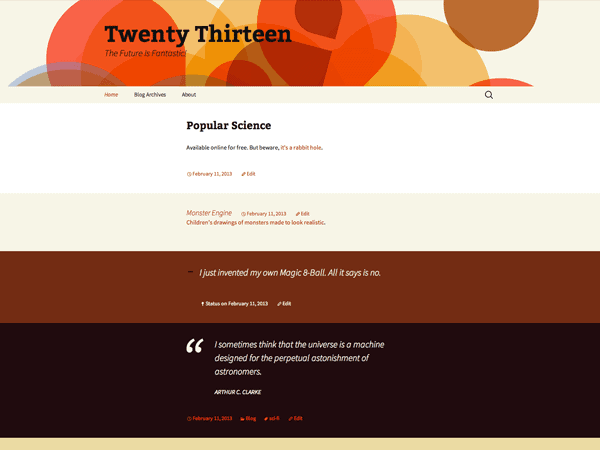
Once you have successfully installed WordPress to your domain, you’ll see a very basic yet clean site:
Your site after WP installation
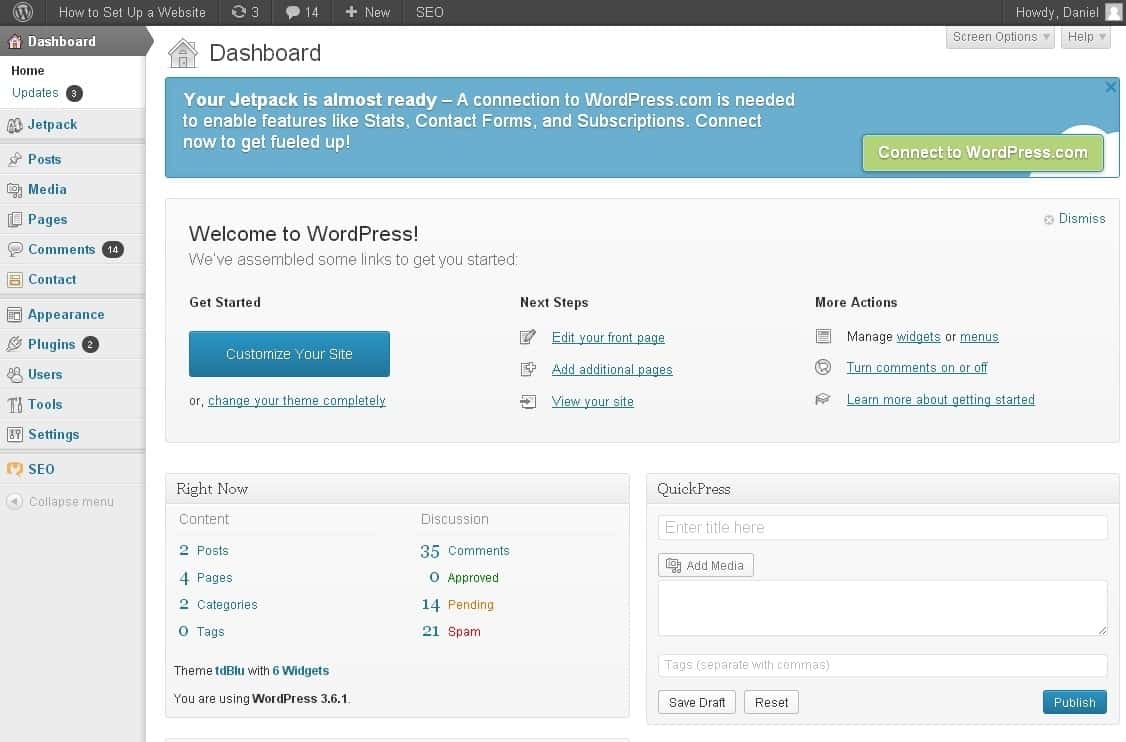
1) Log into your WordPress dashboard to change themes and start building and tweaking your site – you can log in from http://yoursite.com/wp-admin
This is your WordPress dashboard:
This is the place where you can build your site
Looks pretty awesome, doesn’t it?
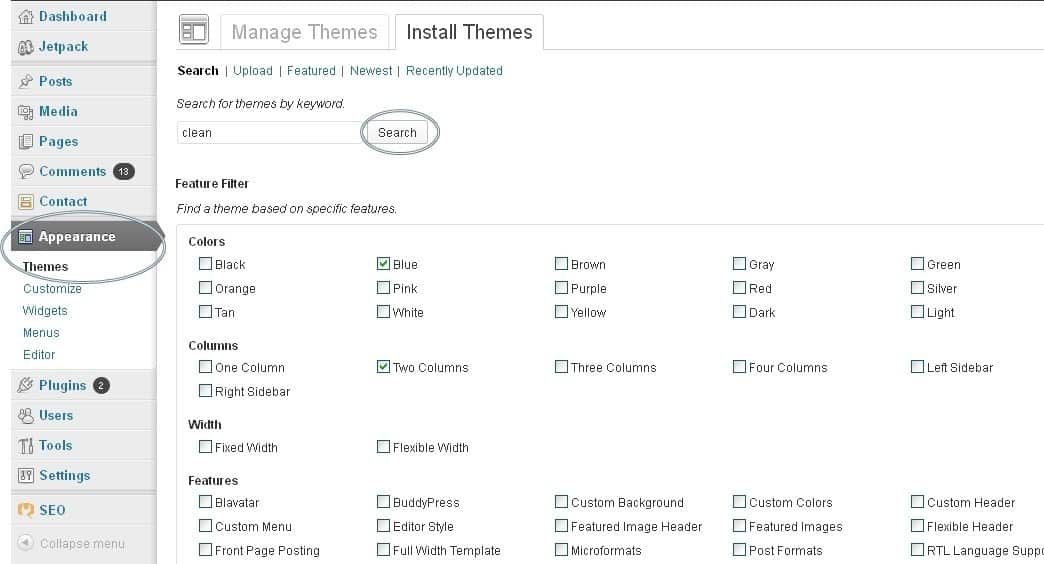
2) Now you need to start looking for a proper theme – make sure it fits with the overall topic of your new website. You can find over 1500 free themes via the WordPress Dashboard (Appearance -> Themes). If you want something more professional or elegant, head over to http://themeforest.net/

However, at first I suggest you to try the free themes because some of them are actually really professional and well made.
Finding themes for your website
As you can see above, installing a new theme (outlook) for your website is very easy. All you need to do is search for specific keywords and/or use filters.
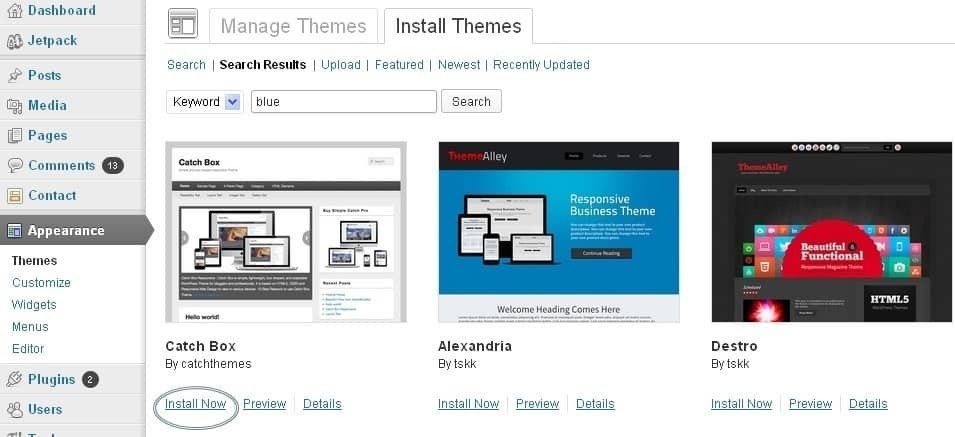
Once you have found a theme you like, click “Install” followed by “Activate”:
Installing a new outlook/design for your site
Finding the perfect theme can take a while, but it’s worth it. If you don’t find anything good right away, you can always return and search further later on. Changing themes won’t delete your previous posts, pages and content. In other words, you can change it as often as you want.
P.S: If you want a theme that works well on mobile phones, search for the keyword “responsive”.


Add content and create new pages

Once you have installed a theme you like, you can start creating content. Adding new pages in WordPress is again very easy, but I’ll cover the basics for you.
Pages: In order to create new pages such as “About Me”, “Resources” etc (like I have on the menu), you need to head over to the WordPress dashboard and look for “Pages” -> “Add New”.
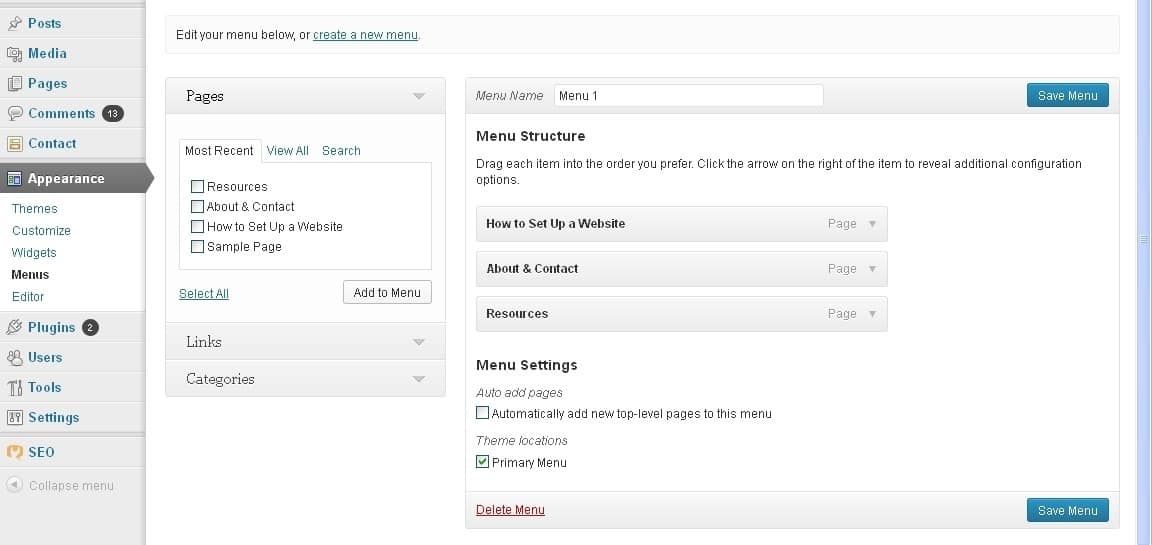
If you want those pages to appear on the menu as well, you need to go to “Appearance -> Menus” and add them to the list.
Creating a new menu for your website
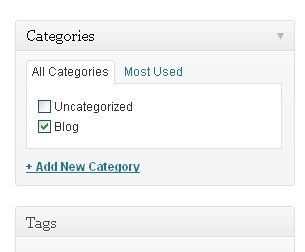
Posts: If you want to add a blog to your website, you can use different categories and posts. Let’s say you want to create a category named “blog”. To do so, simply add it to your menu and start making posts. Here’s what you need to do:
Website categories
a) Create a new category by going to “Posts -> Categories”
b) Create a blog post by going to “Posts -> Add New”. Once you blog post is ready, you need to add the right category for it.
c) Add a new category to the menu


Tweak your website (Widgets, comments & just some “stuff” you need to know)

In this section I’ll cover some of the basics things that will help you to tweak your website.
Changing website title and tagline: You probably noticed, that my website has a title: “How to Make a Website” and a tagline: “… Step by Step tutorial“.
In order to change the title and tagline on your website, go to “Settings -> General” and simply fill in the form.
General website settings
Disabling comments for Posts & Pages: Some websites (business/organisation sites mostly) don’t need any comments from visitors.
While you are writing a new page, click “Screen Options” (top right) and then tick “Discussion”. The “Allow Comments” box will appear at the bottom and all you need to do is untick “Allow Comments”.
In case you want to turn off comments on every new page by default, go to “Settings -> Discussion” and untick those options:
Here you can disable comments
Static front-page: If you want your site to have a static front page, go to “Settings -> Reading” and pick a static page for your website. If you don’t do this, WordPress will take your latest posts and start showing them on your homepage.
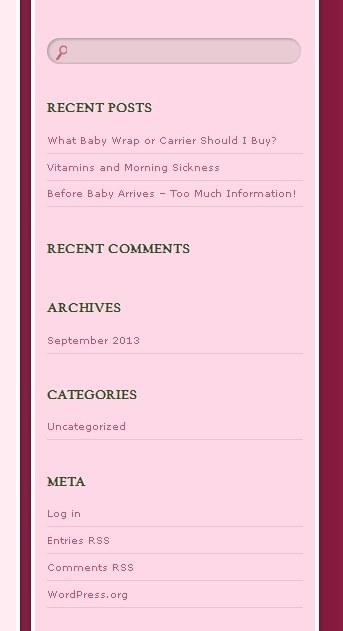
Editing the sidebar: Most WordPress themes have a sidebar on the right side (in some cases it’s on the left). By default you’ll see something like this:
This should be your default sidebar after WP installation
If you want to delete the categories, meta and archives (which are pointless in most cases) go to “Appearance -> Widgets”. From there you can use drag n’ drop to add different “boxes” to your sidebar.
There’s also a “HTML box” which is basically a text box where you can use HTML code.


Install plugins to get the most out of your website

WordPress gives you the opportunity to install different plugins that all add value and make your website more “personal” and unique.
To start installing plugins, go to “Plugins -> Add New” and simply start searching. Keep in mind that there are over 25000 plugin.

But before you go and install every single one, I suggest you to read this article:
wp using plug in .Below, I have put together a list of the most popular and useful plugins that webmasters find useful.
Facebook box: A lot of websites have Facebook plugins on their sidebar. A Facebook Box helps you drive more traffic and likes to your Facebook fanpage (if you have one).
Forum: Interested in starting a forum on your site? Look for the plugin named “bbPress” and follow their tutorials.
Actually there are many more plugins available. Here’s a list of the top 100 plugins for WordPress by Tom Ewer.
… and that is basically it. Now you should have a fully working WordPress website!.
For more Information like my facebook page Global IT service

Thursday, January 22, 2015

Perfect website creating formula.


There are several factors to keep in mind when creating the perfect website. Creating the perfect web design for your business requires a formula of planning and process.link

DecemberSocialMedia-02Step 1: Determine Your Goals & Audience

• Who is your target audience?
• What is the age range of your ideal consumer?
• Why are they visiting your site?
• What device are they viewing the site from?
It’s important to determine the answers to the above key questions before you design or create content for your website. By answering these questions, you can ensure your website is effective and useful for your target audience. Your website should be tailored to your audience and the specific goals you want your website to accomplish.

DecemberSocialMedia-03Step 2: Content & Structure

Think about the content you wish to include on your site. Make sure to include only what’s essential. You don’t want to overwhelm viewers with lengthy information that they have to pick through in order to understand. In addition, its important to ensure your content is above the fold (further discussed here).  Keep the content straight to the point and easy to grasp, making your site easier to navigate and skim through. The structure of your site depends on the goals you previously set forth. Examples of some varying goals that effect the design of a website are:
• Is this an informational site for a business?
• Is this a portfolio site for a photographer?
• Is this an e-commerce site for a clothing boutique?
• Is this a site for a hair salon that needs to be able to book appointments online?
These answers should determine what content the user sees and when they see it. It should also determine the flow of the site, in regards to user interaction.

DecemberSocialMedia-04Step 3: Design

After determining what content you want to include, next comes the design. Think about your target audience again.
  • What type of design will peak their interest?
  • Do you want your site to be elegant, bold, contemporary, or reserved?
  • The type of business you have should also encourage the colors that are used. Should you use blue so that users feel calm and trust or should you use yellow so users feel cheerfulness and warmth?
  • Is the font large enough for your users to read?
The design of your website will effect how you are viewed by those who visit it. A professional design is key to being perceived as a professional company. Your website needs to be easy to navigate and visually appealing to encourage users to actually read the content.

DecemberSocialMedia-05Step 4: Technology

Whether you hire a developer or decide to code the back-end of your site by yourself, it’s important to ensure that your website works as well as it looks. All of your pages should be functioning perfectly, with no dead links, typos, or crashes. You website might look great, but if the functionality falls short, this looks just as bad – if not worse, than poor design.
Some items you need to take into consideration:
  • Is the site outdated and using Flash?
  • Is the site responsive?
  • Does the website take a long time to load?
  • Are there maps of the store locations?
  • Are email addresses click-able?

DecemberSocialMedia-06Step 5: Engagement

Most importantly, you want your website to be engaging. Communication is key. If the user has to dig deep into the site to find information, they are not having a good user experience. You should also include some user interaction.
  • Do you have social media links/streams?
  • Is there a contact form?
  • Is there a newsletter sign up?
  • Is the content valuable?
  • Are there calls-to-actions?
  • Are there any videos?

9 Steps to Starting Your Freelance Web Design Business

Everything has costs associated with it - how much will a move to freelancing cost you? Make a list of the basic equipment you're going to need. At first, it might just be a computer and a phone.
You'll want to factor in the cost of registering your domain name and hosting your own website. You might want to get business cards printed, a dedicated desk, stationery supplies and so forth. You'll need new pajamas for sitting around in all day (optional).
I know people who hopped from one free trial to another for the first 6 months of their freelance career.
Will you need new software? As you start out, download free trials of popular web design software - like Espresso, Coda, Aptana, or Adobe Dreamweaver - it'll give you 30 days to get familiar with it. I know people who hopped from one free trial to another for the first 6 months of their freelance career. When you have the money, purchase the one you liked the best.
Do you need health insurance? Do you need personal liability insurance (yes, if you are taking office space)? Do you need any other insurance, or to pay any kind of taxes before you start out?
Finding a good accountant early on who can help you with this is essential. Most accountants won't charge you for an initial meeting, so meet up with a few local ones, and glean as much advice as you can up front as regards your tax position and any other liabilities you might have.


How are you going to brand yourself? Many freelance web designers use their name as their brand - this is great and can lend real personal attachment - clients know that they're getting an individual, someone who maybe has a bit more flexibility in their availability, someone they can hire probably a bit cheaper than a fully fledged agency.
Alternatively, like I did, consider using a more formal name for your fledgling business, especially if you envisage your business becoming more robust in the future. If you have plans to maybe turn yourself into a studio, with a couple of people working for you, you might want to start out with a more formal company name.
Think about how you would like to be perceived - as an individual brand, or as a young company. Think about what your potential clients will read into this and ask yourself whether that fits in with your view as a freelancer.

You're going to need something to point people to - to show off your expertise, to seal the deal, to… well, you know why you need your own website: who's going to buy a website from someone who doesn't have one? That's right. Nobody.
Your website should at the very least clearly state the services you offer, provide a clear means for people to contact you, and wherever possible, showcase some of your work. 'Ahh,' I hear you say, 'but how can I showcase work if I'm just starting out?'. 'Well, ' you hear me answer, 'let me count the ways…'
I bet there are organizations or groups in your local community who could benefit right now from your services.
Do work for free. I don't mean take on spec work, or enter design competitions, or get your hopes up with the guy who says 'look, just do this one little project for me and I'll give you more work than you can handle in the future'. (Put the phone down on that guy. Now.)
I bet there are organizations or groups in your local community who could benefit right now from your services. Charity organizations, social clubs, church groups, community sports, local schools… whoever they are, they'd likely be extremely grateful to you if you could provide them with a new website, a Facebook page, some banner ads, a blog, or whatever. You can do it for free or very low cost, you're helping a worthy cause, and you're generating a portfolio piece.
Do 3 or 4 of these and suddenly your new portfolio is looking quite respectable. Nobody puts all the work they've ever done in a portfolio - so just having a few pieces in there might be enough for you.

This is a whole separate debate in itself, but you need to at least have a framework for establishing your rates up front or else you'll end up working for peanuts, find it difficult to ever raise your rates, and it will take much longer for your freelance web design business to get off the ground.
Figure out your monthly costs - rent, heat, power, phone bill, travel, insurance, tax liability, etc. Multiply that by 12. Add on what you'd like your annual salary to be. Divide that whole thing by 48 to figure out how much you need to make in a week (allowing for 4 weeks vacation). Then, assume that you'll be able to do billable work for about 20 hours a week at first. That's a good place to start for your hourly rate.
You should try and get as specific as you can - although this can be difficult as you’re looking for your first client. But the resources below will help.
Notice how I haven't talked about the actual 'doing web design' bit? That's because you're not really in the business of web design at all. You're in the business of selling. From now on, your only real job is to promote your services.
Being a fabulous web designer might make you feel all tingly inside, but it means nothing if you’re unable to sell your services.
Being a fabulous web designer might make you feel all tingly inside, but it means nothing if you're unable to sell your services. It won't put food on the table, that's for sure.
So, you need to formalize a sales cycle: a process for finding prospects, cultivating your relationship with them, educating them about your services, offering your services to the right ones, fulfilling their expectations, and developing that relationship with them.
You're going to need ways to find good prospects. Start by identifying your ideal client, who are they, what do they do and where do they hang out (either in person or online)? Start hanging out there too and engaging them in conversation. Work on your elevator pitch - that little burst of information that explains clearly to potential clients how you can help their business and why they should hire you to do it.
Use your elevator pitch to summarize who you offer your services to, identify the biggest concerns facing those people, explain how you solve those problems, show how you've helped similar people in the past. In conversation it might go something like this:
You know how small businesses often struggle to get the most out of their websites? Well, what I do is create websites that really engage browsers and work hard to convert them into customers - with measurable results. One company I worked with recently was able to increase online sales by 40% over 3 months.
You've told people your target market, and what their concerns are. You've explained how you tackle the problem, and you've given an example of how you've achieved. Your day is going to need structure. It'll help you if you can have a consistent structure for your working day. Have a daily schedule mapped out which works around when you are most productive and when you are more likely to get things done.
I try and group like tasks together - if I have a bunch of phone calls to make, I try and do them all mid-morning (after my 2nd cup of coffee). Emails I typically handle mid-afternoon. If I'm coding, I find that easiest to do first thing in the morning when my brain is fresh, and, oddly, last thing in the evening when I get a second wind.
Go with whatever works for you. But being able to stick to a similar routine each day will help you.
The great thing about being a freelance web designer is that there is a tremendous community of professionals who can support you in what you do. It's a very open, communicative bunch of people. So start following people on Twitter, getting to know them on LinkedIn, Facebook and other social media hang outs. There are other people out there in similar situations and they have a lot to offer.
Be sure to get involved in the communities where you customers are.
LinkedIn offers a number of groups for freelance professionals. Many are great places to network. Answering questions on LinkedIn is another great way to network - both with fellow professionals and potential clients. Sign up to receive RSS updates on questions from web development boards and spend 10 minutes each day helping out people in need. You establish your expertise and help people out who may be looking for your services.
Be sure to get involved in the communities where you customers are. If you're targeting a specific niche, what online forums do they use? Are there newsgroups that you should belong to? Are there regular meetups that you should be attending?
Immerse yourself in the communities in which you operate and you'll build up a really strong network - not just of other web designers but of potential clients and referrals.
There are a wealth of web design conferences and other opportunities out there for you to keep on learning your craft. Fabulous resources with a wealth of information to share - some free, some paid for. The important thing is to make time for yourself to develop your craft, to continue learning and to share what you learn with others.
Something often overlooked though is to continue learning the art of freelancing itself - not just web design. There comes a point where, for most of us, continuing to learn more about web design is 'only' about our own professional and personal development. It becomes less valuable to the majority of our clients that we know XYZ about latest technology ABC. (It is still valuable to us, but the salable value of the skill becomes diminished). It is at this point that becoming a better freelancer is more important than becoming a better web designer - so never stop learning that also.
Of course, as you go on you’ll need more bits and pieces. I use software to track time, keep on top of task management, you might use tools for project management or for managing your finances. Here, I’ve listed out a few for each main category of my day to day freelance existence. Most are paid for services, but some are free or have very cheap entry level plans.
One word of advice, take an audit of all your monthly web app payments at the end of each year (or every 6 months) You may well be surprised at how many things you’ve signed up for - and how much it’s costing you!So, there it is. A by no means comprehensive, easy to disagree with, guide to the things you’ll need to start your freelance web design business. Don’t take my word for it though - get out and do it!

Monday, January 19, 2015

Web designer tips

                       This Is Why Thawte SSL Is So Much Needed For Your Websit.
The Internet is a diverse and competitive landscape. With almost every business and industry describing themselves as “digital” to at least some degree, websites have become an essential resource – not to mention a vital asset.
Naturally, security is a big concern and while there is expected to be more than 1 billion live websites by the end of this year there are still many people who are failing to take the necessary precautions to protect their sites.

haking_home_bannerBrits were already being chastised for risking billions of pounds by inputting sensitive information into insecure websites in 2008 and although improvements have been made, there is still work to be done.

Identifying trends

While web users can ensure that they are vigilant about the information they input into websites and the sites which they choose to use, it is down to those developing the websites to take sufficient steps to secure their site.
As well as installing relevant security software to prevent infiltrative threats from viruses and malicious intent, they must also consider how they register their website and encrypt its sensitive data.

Authentication-Trust-ProtectionThe most common form of security here is SSL certification – which stands for Secure Socket Layer. SSLs ensure security and confidentiality within websites by using cryptographic protocols to secure internet-based communications.
There are different types of SSL available and, according to data, trends dictate that Thawte SSL certificates are favoured over StartCom technologies.
In research, 2.5% of all websites used Thawte – representing a 7.4% market share. For StartCom this was considerably lower with only a 2.7% market share generated by use within 0.9% of websites.

Staying protected

For those looking to keep their websites as secure as possible, the need for SSL certification – of any description or brand – is clear. Startcom SSL and similar products are vital to ensuring the performance of businesses and websites but individuals need to seek reputable, reliable services when investing in this protection.
This means turning to companies such as Thawte who offer affordable SSL certificates that make advantage of their 17-year-long history of excellence and reliability.
With impeccable customer support delivered on a global level and a reputation for providing trusted website security services, these are exactly the type of features which website owners should be looking for.(collected)